
Last verified: Oct 28, 2026 · Sources: 5
Korea eSIM vs SIM vs Wi-Fi: Which Is Better?
When researching Korea eSIM vs SIM vs Wi-Fi, most travelers find that an eSIM offers the best balance of price and hassle-free setup as of 28 October 20…
- Section
- Tools
- Last verified
- Oct 28, 2026
- Sources
- 5
- Cluster
- esim

At a glance
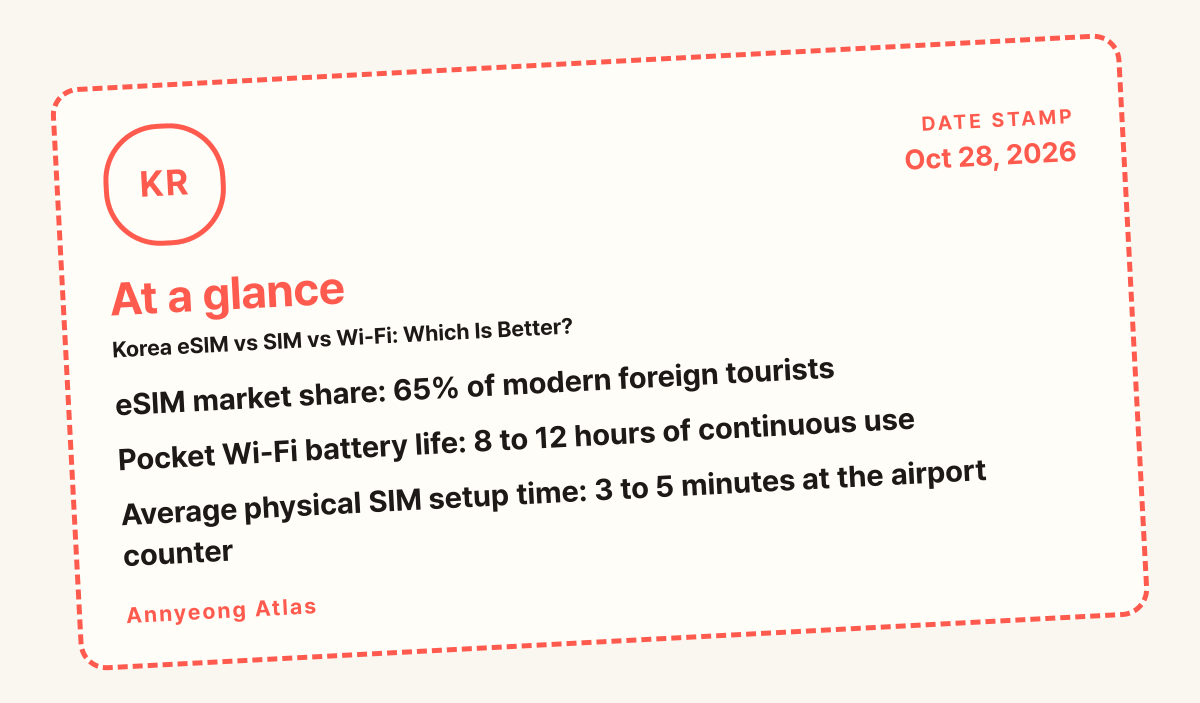
- eSIM market share: 65% of modern foreign tourists
- Pocket Wi-Fi battery life: 8 to 12 hours of continuous use
- Average physical SIM setup time: 3 to 5 minutes at the airport counter
For a first-time visitor landing in Seoul, an eSIM is the overall winner for convenience and instant activation. Travelers who own older phones lacking eSIM compatibility, or those who need to connect multiple devices at once, should pick a traditional physical SIM card or a pocket Wi-Fi router instead.
Which one should you pick?
Deciding how to access mobile data while navigating South Korea requires balancing your smartphone’s technical specifications with your daily travel style. Modern handsets purchased within the last several years almost universally support embedded subscriber identity modules, which completely eliminate the physical friction of handling tiny plastic cards or carrying extra charging bricks. If your primary goal is stepping off your flight, clearing immigration at Incheon Airport (Incheon International Airport), and immediately pulling up subway directions on Naver Map without stopping at a commercial kiosk, a digital profile is the most frictionless route available. Before making your final selection, review the helpful resources on Plan to ensure your itinerary logistics align with your connectivity needs.

Traditional physical SIM cards remain an exceptionally reliable fallback for travelers who carry older phone models, carrier-locked devices, or secondary handsets that do not accept digital profiles. Swapping a physical card requires opening your phone tray with a small ejector pin, so you must take care not to lose your home country’s primary nano-SIM while traveling abroad. Airport service counters operated by major local carriers make purchasing and configuring a physical card straightforward, though you may encounter short queues during peak arrival banks. For additional insights on maximizing your trip once you are connected, browse through the practical recommendations found in Stay.
Pocket Wi-Fi routers operate on a fundamentally different principle by generating a localized personal hotspot that can tether up to five or ten separate devices simultaneously. Families traveling together, remote workers juggling a laptop and a tablet, or groups of friends who prefer to stay grouped closely together often find great value in sharing a single rental unit. The primary trade-off is the daily responsibility of managing battery life and carrying an extra piece of hardware in your daypack alongside a power bank. To discover local dining spots and culinary recommendations using your new mobile connection, check out the curated guides on Eat.
When budgeting for your connectivity options, keep in mind that prices vary widely depending on data caps and rental durations, with typical pocket router rentals starting around 5,000 KRW (approximately 4 USD) per day, whereas physical and digital options might charge flat fees based on total gigabytes used. During scheduled maintenance updates such as the VISITKOREA system check noted on October 26, 2026, having a reliable pre-activated data plan ensures you can still navigate Gyeongbokgung (경복궁) or locate nearby attractions without interruption. If you encounter any unexpected billing exceptions or device compatibility issues, remember to confirm on the official page for the most accurate terms before departure.
Side-by-side comparison
Evaluating mobile data choices side by side clarifies how cost, hardware requirements, and daily convenience intersect during an international trip to East Asia. While digital profiles win on pure speed of acquisition, physical hardware options offer distinct advantages for specific user groups who prioritize shared connectivity or device compatibility. To explore complementary travel gear and digital utilities that streamline your journey, visit Tools.
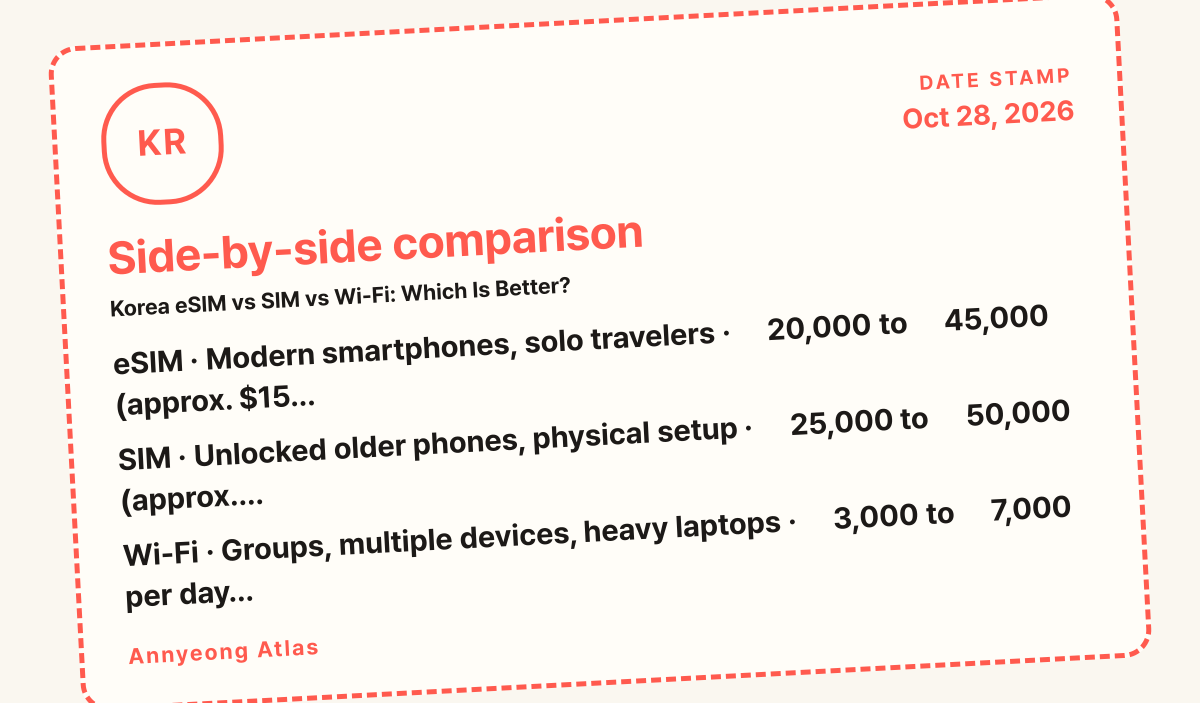
| Option | Best for | Cost | Skip if |
|---|---|---|---|
| eSIM | Modern smartphones, solo travelers | ₩20,000 to ₩45,000 (approx. $15 to $33) | Your phone is carrier-locked or older |
| SIM | Unlocked older phones, physical setup | ₩25,000 to ₩50,000 (approx. $18 to $37) | You hate swapping tiny plastic cards |
| Wi-Fi | Groups, multiple devices, heavy laptops | ₩3,000 to ₩7,000 per day (approx. $2 to $5) | You refuse to carry an extra charged battery |
The comparison table above demonstrates that pricing across all three categories remains competitive, though daily rental fees for pocket routers accumulate quickly over extended itineraries exceeding two weeks. Solo travelers almost always save money and luggage space by adopting a digital profile, whereas larger travel parties amortize the flat daily router rental fee across several users. Regardless of the format you choose, ensure your device settings allow data roaming for the duration of your stay in the country.
When organizing your arrival logistics, note that major portals like Incheon Airport manage high passenger volumes daily, with documented peak operating windows between 05:00 and 08:00 as well as 16:00 and 19:00. Navigating these busy terminal blocks means physical counter lines for traditional cards or pocket routers can occasionally take longer than anticipated during high-traffic hours. Planning ahead allows visitors to bypass stressful airport queues entirely by installing a pre-purchased digital profile before departure.
For travelers utilizing physical cards, the installation step requires manually ejecting your home country nano-chip using a small metal pin and safely storing it until your return flight. Users must confirm that their specific handset is fully carrier-unlocked prior to departure, as locked hardware will persistently reject foreign network signals regardless of the physical card inserted.
Pocket router rentals typically incur a deposit fee alongside the daily rate, with exact penalty charges for lost hardware set at standard replacement costs or confirm on the official page. Keeping the portable battery charged throughout long day trips visiting cultural landmarks such as Gyeongbokgung (경복궁) is mandatory to prevent sudden internet blackouts while navigating unfamiliar subway transfers.
Who should pick which
Solo travelers who navigate independently through urban transit networks, rely on translation apps, and prefer a minimalist setup will find that digital profiles eliminate unnecessary airport friction. Because these virtual plans download directly via a QR code sent to your email inbox, you bypass service counters entirely and walk straight out to the airport express train. If your phone supports dual-SIM functionality, you can even keep your primary home number active for essential SMS verification while routing all heavy data usage through the local Korean network profile.
Group travelers, families with teenagers, and digital nomads carrying multiple connected gadgets should lean toward a pocket Wi-Fi router or individual physical SIM cards depending on whether the group stays together. A shared router ensures that every family member’s device connects automatically upon landing without requiring individual phone configuration steps or carrier compatibility checks. However, if family members plan to split up during sightseeing excursions, individual physical cards or digital profiles become mandatory to prevent sudden communication blackouts across the city.
Budget-conscious backpackers should carefully calculate their total days on the ground before committing to a rental contract, as multi-week pocket Wi-Fi rentals can surpass the upfront price of a 30-day digital data package. For instance, renting a portable router for a short 5-day trip might cost around 25,000 KRW (approximately $18 USD), whereas longer stays quickly escalate in total fees. Conversely, business travelers who require secure, uninterrupted laptop connectivity while riding the KTX high-speed train often prefer pocket routers or dedicated tethering setups on their primary smartphones. Reviewing the official documentation provided by VisitKorea (한국관광공사) can also help clarify regional coverage expectations outside major metropolitan centers like Seoul (서울) and Busan (부산).
To ensure a seamless arrival, you should verify device compatibility well before your departure date, especially since older smartphone models lack embedded chip technology. If you opt for a physical card upon landing at Incheon International Airport (인천국제공항), you can visit the designated service desks usually operational from early morning until late evening, with daily rates starting around 4,000 KRW (roughly $3 USD) per day depending on the carrier. Keep in mind that scheduled platform maintenances, such as the routine system updates noted by VISITKOREA on October 26 at 08:00-08:30 (KST), may occasionally affect online activation portals, so downloading your configuration profile prior to boarding your flight remains the safest strategy.
The verdict
Selecting the right connectivity tool ultimately depends on your specific hardware constraints, your tolerance for carrying extra electronic accessories, and your group size. For the vast majority of modern travelers visiting South Korea, a prepaid digital profile delivers the most seamless blend of immediate activation, reliable local network speeds, and zero physical clutter. Purchase your plan from a reputable provider before your flight, install the profile while connected to your home Wi-Fi, and enjoy instant data access the moment your wheels touch down on the runway.

Plan your connectivity purchase at least one day before your departure to ensure your email receives the installation QR code and instructions without last-minute panic. If your smartphone is locked to a domestic carrier or lacks modern embedded-chip compatibility, do not panic, as physical plastic cards remain widely available for pickup at major transportation hubs like Incheon International Airport (인천국제공항). You can easily secure a physical card upon arrival, though daily rental rates or package fees generally start around 5,000 KRW to 10,000 KRW (approximately $4 to $8 USD) depending on the provider and data allowance selected.
Families, remote workers, and travelers juggling multiple gadgets simultaneously often find that renting a portable pocket hotspot router represents the most practical solution, despite the minor inconvenience of managing battery levels throughout the day. When renting a pocket hotspot device, expect to pay a security deposit or daily rental charge, or confirm on the official page if promotional discounts apply during peak holiday seasons. Always check the official VISITKOREA portal or consult official transit resources like the Incheon Airport English site and Welcome to Seoul, Visit Seoul guide for updated terminal pickup booth locations before you travel through Gyeongbokgung (경복궁) districts or other major city centers.
More Korea guides: How to complete the Korea e-Arrival card.
FAQ
Does an eSIM work on all phones?
No, digital profiles require a relatively modern smartphone equipped with embedded hardware support, and your device must be fully unlocked by your home carrier. You can easily check your phone’s settings menu or dial a carrier confirmation code to verify compatibility before purchasing a travel data plan.
Can I keep my physical phone number active with an eSIM?
Yes, many modern handsets allow you to run a dual-SIM configuration where your home physical SIM handles incoming text messages while your digital profile supplies local data. This setup allows you to receive crucial bank verification codes without paying exorbitant international roaming fees.
Where do I pick up a pocket Wi-Fi router?
You can reserve your router online and collect the physical device directly from dedicated carrier desks located in the arrival halls of Incheon Airport (Incheon International Airport) or Gimpo International Airport. Returning the unit is equally simple, as you drop it off at the designated airport counter right before your departure flight.
Which local networks do these options use?
Most major tourist data plans operate on top-tier national telecommunications infrastructure managed by established domestic carriers such as SK Telecom, KT, or LG Uplus. These networks provide robust 4G LTE and widespread 5G coverage across both dense urban districts and rural countryside routes.
Related guides
Korea daily travel budget (2026 Prices)
Preparing a realistic Korea daily travel budget for your trip on 28 October 2026 requires understanding your personal style, as daily spending ranges fr…
K-ETA who needs it in 2026: Answers to 8 Questions
K-ETA who needs it in 2026: Travelers from eligible visa-waiver countries need a K-ETA unless they fall under specific temporary exemptions valid…

Best areas to stay in Seoul
Best areas to stay in Seoul: When researching the best areas to stay in Seoul, first-time international travelers should prioritize central districts…

Korea autumn leaves 2026
Korea autumn leaves 2026 peak across the country from mid-October through mid-November.